Plan a Trip How To Ride
Discover how simple it is to Ride On VIA. Our service area in the greater San Antonio region covers more than 1,200 square miles and our route frequencies are constantly improving.
And we are meeting riders’ needs with our expanding VIA Link on-demand service. If you need transportation in or out of one of our Link zones, this is a great option for just $1.30 a trip.
Start your adventure with our easy steps below. If you are still having trouble with your trip, feel free to call our customer service (210) 362-2020.
-
1Plan your trip.
There are many ways to plan a bus trip. Try a few different methods to see which one you prefer.
Google Maps – Go to google.com/maps and enter where you want to go. Then click “directions” by transit.
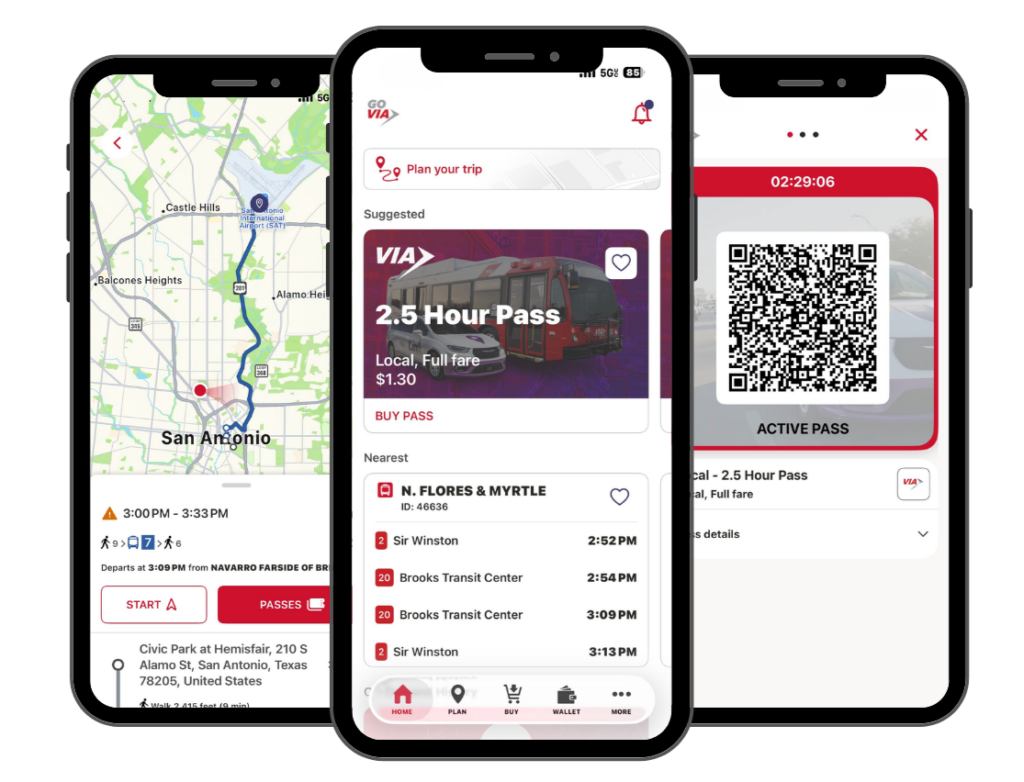
GO VIA App – Download the free VIA goMobile+ app for Apple and Android devices to plan trips and purchase tickets. Select Trip Tools in the app for a link to plan trips using Google Maps.
VIAInfo.net – In addition to Google Maps for trip planning, VIA provides individual bus schedules and other tools for riders to use on the Trip Planning page.
Transit App – VIA partners with Transit App, which allows instantly see nearby transit options, get step-by-step navigation, plan trips, check service alerts, and browse schedules too. Learn more about the Transit App and how to download it.
VIA Customer Service representatives are available to help customers plan a trip from 6 a.m. to 10 p.m. Monday-Friday; 7 a.m. to 7 p.m. Saturday, and 8 a.m. to 5 p.m. Sunday at (210) 362-2020. Schedule is subject to change during holidays.
-
2Buy your ticket.
VIA offer riders multiple ways to pay for fares and passes:
CREDIT/DEBIT CARD: You can now use a contactless credit/debit card right on the bus. Same fare, no added fees. Just tap and go. VIA will accept contactless Visa, MasterCard and Discover cards. American Express will not be accepted.
MOBILE WALLET: Use your Apple, Google or Samsung mobile wallet when boarding and inform the operator if you qualify for a discount, otherwise a full fare will be charged. Day Passes can not be purchased on the bus using a credit card or mobile wallet.
CASH: Riders can always pay with cash when boarding a bus and VIA’s new farebox makes it simple to simply insert bills and coins; a change receipt will be provided for overpayments of a $1.00 or more.
goCARD: The VIA goCard is an electronic reloadable fare card. With the goCard customers can add value and passes to their card instead of carrying cash. It is a great addition to VIA’s innovative goMobile ticketing app.
goCARD LITE: VIA’s goCard lite is a smart card that replaces the e-fare card and can be loaded with a 31-Day Pass, 7-Day Pass and/or Day Pass. Simply tap the fare box with the goCard lite. The remaining value and expiration will be displayed on the farebox screen.
GO VIA APP: VIA’s GO VIA app allows riders to purchase One-Day, 7-Day, 31-Day, 2.5-Hour, VIAtrans, and Park & Ride passes directly onto a mobile device for quick and easy payment when boarding. Learn More about GO VIA
ON THE BUS: Riders can purchase single-ride fares or a single Day Pass on the bus with cash. Day Passes must be requested before inserting cash into the farebox. Change will be issued if amount due exceeds $1 and will be in the form of an e-fare change card if requested.
OTHER OPTIONS: Fares and passes also can be purchased at most VIA Customer Service Centers and most H-E-B stores. See the complete list of tickets, passes and discounts on the Fares page.
-
3Get to your bus stop.
Follow the instructions on your trip planner to get to your bus stop. Match the 5-digit stop ID at the stop with what’s on your instructions. You can also verify that the bus route number you plan to ride is listed on the sign.
-
4Board the right bus.
As a bus approaches your stop, look for the 1- to 3-digit route number on the digital sign at the top and side of the bus and match it up with the route number on your instructions. Be sure the bus operator sees you, or wave your hand as the bus approaches so they know you want to board.
Activate your mobile ticket or have your paper ticket ready to show the operator.
Real-time arrivals – Several stops and transit centers have digital signs that provide next bus arrival times based on the real-time location. You can also text the 5-digit Bus Stop Number on the bus stop sign to 52020 for real-time information. More about Real-time arrivals.
-
5Get off at your stop.
Sit back and relax until it’s time to get off the bus.
When your stop is next, alert the operator by pulling the yellow cord or pushing the yellow strip near the window. Operators may pass the stop if they are not alerted.